


Version control system for files and tables




Lix is a version control system for files and tables. Store files of any format alongside SQL tables you define in Lix in one repository. Branch, diff, merge, and roll back changes to both. Embed Lix in a product or connect to a server.
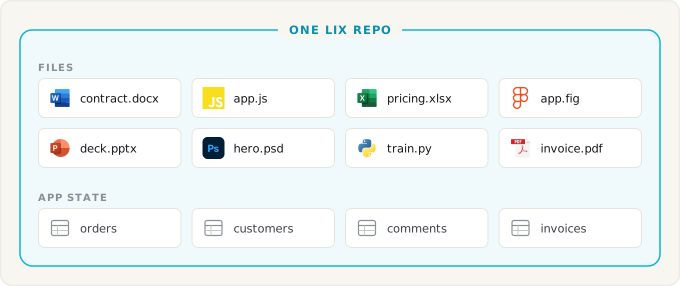
- 📄 Any file. Store text, binaries, and large files, including Word, PowerPoint, CAD, and video. Plugins provide structured diffs and merges for supported formats, including Markdown and CSV. Other formats have whole-file history.
- 🗃️ SQL tables. Version rows for CRM records, logs, and other application data alongside files.
- 🗄️ Designed as a database. Files, tables, and history share one ACID OLTP database. Query millions of rows with SQL.
- ⚡ Real-time collaboration. People and agents share a repository and see changes as they happen.
- 🔒 Permissions (planned). Per file, per group, stored in the repository and versioned like any other change.
- 🧩 Embeddable. Runs in-process as a library. Storage is pluggable: memory, filesystem, browser OPFS, or S3.
Try a hosted repository
Try Lix in the cloud with LixRay:
Why not Git?
Git versions files well, but the tables behind an app usually live in a separate database. Committing a SQLite database to Git versions its bytes, not its rows: changes are hard to review or merge, and each database revision adds to the repository. Lix versions queryable SQL rows alongside files.
Early inlang used Git for translation files and its pull request workflow. As its structured messages grew, it moved to SQLite and Lix so application data could have that workflow too.
| Git | Lix | |
|---|---|---|
| Process model | CLI-first | Library in your process |
| Storage | Local disk | Memory · filesystem · OPFS · S3 |
| Application tables | Separate database | Versioned SQL rows with the files |
| Recording changes | Manual commits | Tracked writes commit automatically |
| Formats | Any bytes; text diffs | Any bytes; structured diffs via plugins |
| Collaboration | Push and pull | Real time |
Getting started


 Python ·

npm install @lix-js/sdk @lix-js/storage-filesystem
Run locally with FilesystemStorage:
import { openLix } from "@lix-js/sdk";
import { FilesystemStorage } from "@lix-js/storage-filesystem";

const lix = await openLix({
  storage: new FilesystemStorage({ path: "./repository" }),
});

await lix.execute("INSERT INTO lix_file (path, content) VALUES ($1, $2)", [
  "/notes/status.txt",
  new TextEncoder().encode("ready"),
]);
Or against a server:
const lix = await openLix({
  server: {
    url: "https://example.com/lix/01936f4e-7b6c-7c3d-8f9a-123456789abc",
  },
});
Lix is in alpha.
Prime use cases
Co-locate code, documents, and app state
Code, documents, design files, and media often live in separate tools from the tables behind an app. Lix can keep those files and SQL tables in one repository with one history. A branch can hold a document edit and its related row changes, so you can review, merge, or roll back both together. This also creates a foundation for change proposals and automated checks beyond code.
// A script, a document, and an app table change in one transaction.
await lix.transaction(async (tx) => {
  await tx.execute("INSERT INTO lix_file (path, content) VALUES ($1, $2)", [
    "/automations/report.js",
    source,
  ]);
  await tx.execute("INSERT INTO lix_file (path, content) VALUES ($1, $2)", [
    "/docs/handbook.docx",
    handbook,
  ]);
  await tx.execute("UPDATE orders SET status = 'shipped' WHERE id = $1", [1002]);
});
Give each customer a repository
Your customers want agents that write automations and edit their documents, with a way to review and undo. Drive's file history does not cover your app's SQL tables. Embed Lix and give each customer a repository that holds their code, documents, spreadsheets, media, and app tables.
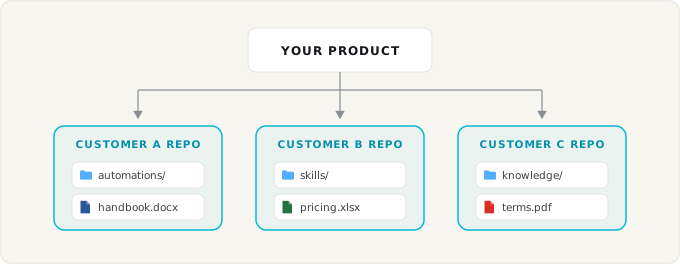
// One hosted repository per customer.
const lix = await openLix({
  server: {
    url: `https://example.com/lix/${customer.repositoryId}`,
  },
});

// The agent writes an automation. Lix commits the change automatically.
await lix.execute("INSERT INTO lix_file (path, content) VALUES ($1, $2)", [
  "/automations/booking.ts",
  code,
]);

// Your UI shows the diff. The customer clicks accept or undo.
Build versioned workflows into products
Your app reads and writes SQL rows and normal files. Lix records every change with its author, so history, blame, branching, and rollback are queries instead of features you build.
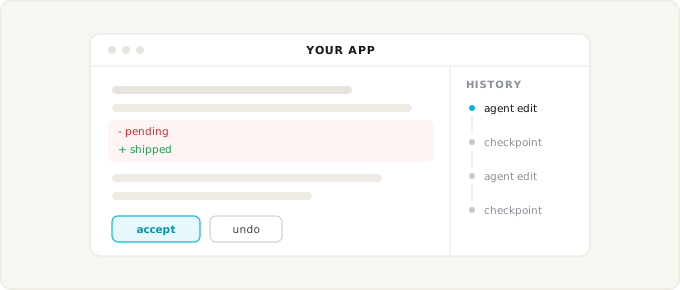
// A normal app write. "orders" is a table you registered with a Lix schema.
await lix.execute("UPDATE orders SET status = 'shipped' WHERE id = 1002");

// The history sidebar, diff view, and undo button are queries:
const changes = await lix.execute(`
  SELECT created_at, account_id, schema_key, row_pk, snapshot_content
  FROM lix_change
  ORDER BY created_at DESC
`);
How Lix works
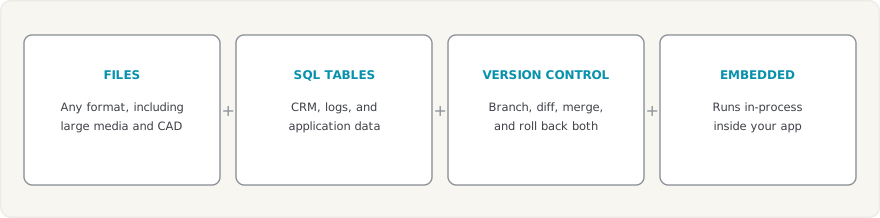
Lix puts four capabilities in one library:
Files and tables
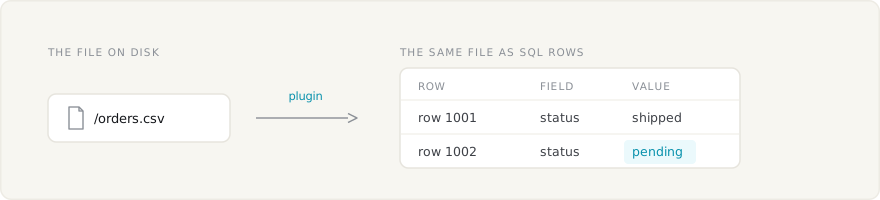
Plugins can map parts of files to SQL rows. A paragraph, cell, or property becomes a row Lix can version. Your own tables can hold application data in the same repository.
With FilesystemStorage, the file stays available on disk. Its rows are queryable with SQL. Lix tracks changes to both.
Runs in-process as part of your infrastructure
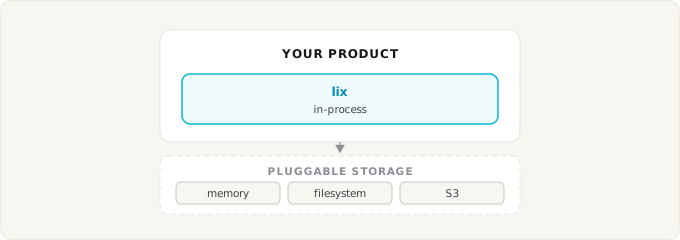
Lix runs in-process with pluggable storage: memory, filesystem, browser OPFS, or S3. See the Storage docs.
Learn more
- Getting Started Guide - Build your first app with Lix
- Documentation - Full API reference and guides
- Discord - Get help and join the community
- GitHub - Report issues and contribute